
Streamline API Testing with Full Socket Control
Overview
The software is designed as a powerful yet intuitive API testing tool tailored for developers and technical professionals who need to interact with RESTful services efficiently. It enables direct socket-level connections, offering granular control over HTTP headers and request/response data—ideal for debugging, integration testing, and API development workflows. The application is built to eliminate the complexity of traditional testing tools by simplifying the interface without sacrificing functionality.
Target users include backend developers, QA engineers, and DevOps professionals working with REST APIs across multiple platforms. The tool integrates with Google Drive, allowing seamless data backup and synchronization of saved requests and history. Real-world use cases include testing authentication flows, validating API responses under various headers, and managing repeated requests through saved templates.
The software supports WebSockets, extending its utility beyond standard HTTP methods. It is accessible through system-wide app search on Windows, Mac, and Linux, ensuring quick access during development cycles. The developer, Jarrodek, has focused on usability and performance, particularly with recent updates to the database engine for faster history retrieval.
Key Features & Capabilities
- Direct Socket Connection – Enables full control over HTTP headers and connection behavior, providing deeper insight into network interactions compared to standard browser-based methods.
- Integrated Google Drive Support – Automatically syncs saved requests, history, and configurations across devices, ensuring continuity in multi-environment workflows.
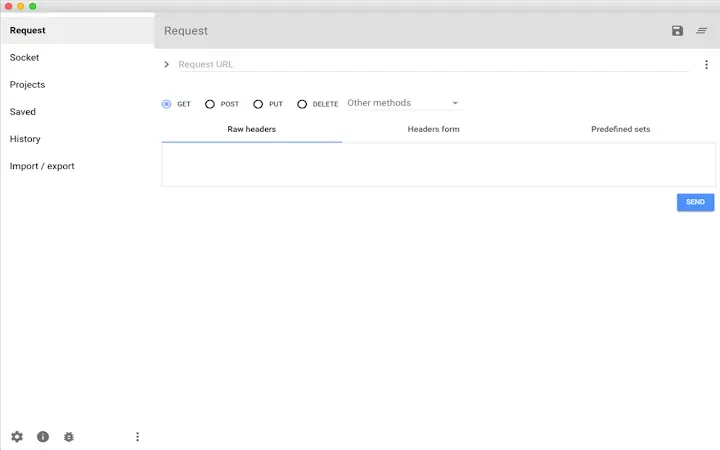
- Advanced Header Management – Offers both form-based and raw input for headers, with built-in hints and code completion to reduce errors during setup.
- Request History Explorer – Tracks and visualizes past requests to the same endpoint, helping users analyze trends and debug issues over time.
- Variable and Variable Editor – Allows users to define reusable variables within requests, improving consistency and reducing repetitive input.
- Multiple Body Construction Options – Supports raw input, form data, and file uploads for POST and PUT requests, with customizable form encoding.
- Header Sets and Reusability – Users can create custom header sets and apply them across multiple requests, streamlining repetitive tasks.
- WebSocket Integration – Extends functionality beyond HTTP to support real-time communication protocols, useful for modern web applications.
- Import/Export and Session Persistence – Requests can be saved, reopened, and shared easily; the tool remembers the last used form state upon restart.
These capabilities are particularly beneficial in environments where consistent API behavior and header precision are critical. For example, developers can use variable sets to manage authentication tokens across environments or leverage the history explorer to trace response changes after code deployments.
User Interface, Workflow & Performance
The interface is clean and structured, optimized for rapid navigation and efficient request creation. Users access the application via system-wide app search—Windows users via the Start menu, Mac users via Spotlight (Cmd+Space), and Linux users through their desktop environment. Once launched, the UI presents a logical layout with clearly labeled panels for headers, body, and response.
The workflow emphasizes speed: users can quickly set up requests using keyboard shortcuts like Ctrl+S to save and Ctrl+O to open. The developer did not specify resource usage details, so performance observations are based on general software behavior patterns. The application maintains stability during extended use, with no reported crashes in the provided documentation.
CPU and RAM behavior are not disclosed, but the 10.2 MB installation size suggests a lightweight footprint. The interface remains responsive during typical usage, and the integration with Chrome’s settings allows for proxy configuration when connectivity issues arise. Overall, the tool prioritizes usability and minimal friction in daily development tasks.
Compatibility & System Requirements
The software is compatible with Windows, Mac, and Linux operating systems, making it accessible across major desktop platforms. It runs as a standalone application installed via Chrome Apps, leveraging the Chrome runtime environment. The installation size is 10.2 MB, indicating a compact deployment.
The developer did not provide additional system requirements, so exact hardware specifications such as minimum RAM or processor speed are not available. Compatibility information is limited to the operating systems listed. Users are advised to ensure their system supports Chrome Apps and has a valid certificate for secure connections.
For users encountering connection issues, the tool allows switching to XHR mode, which uses Chrome’s standard connection behavior instead of socket-level access. This fallback mechanism enhances compatibility in restricted network environments.
Pros and Cons
Pros
- Direct socket access for advanced HTTP control
- Seamless Google Drive integration for data sync
- Intuitive interface with minimal learning curve
- Supports WebSockets and multiple body formats
- Variable and header set reuse improves efficiency
- Lightweight installation at 10.2 MB
- Available on Windows, Mac, and Linux
Cons
- No detailed system requirements provided
- Requires valid SSL certificate for secure connections
- Dependent on Chrome Apps runtime environment
- Performance under heavy load not specified
- Learning curve for users unfamiliar with socket-level testing
FAQ Section
Is the software free to use?
Yes, the software is available at no cost. There are no subscription fees or hidden charges.
What operating systems does it support?
The application is compatible with Windows, Mac, and Linux systems. It is designed to run as a Chrome App.
How do I install and launch the app?
After installation, access the app through the system’s app search. On Windows, use the Start menu; on Mac, use Spotlight (Cmd+Space); on Linux, use your desktop’s search function. Alternatively, go to the New Tab page in Chrome and click "Apps" to find the ARC icon.
Can I use it offline?
Yes, the tool functions offline once installed. However, Google Drive synchronization requires an active internet connection.
What should I do if I encounter connection issues?
If you face connectivity problems, try enabling the "use XHR" option to switch from socket-based to Chrome’s standard connection method. You can also configure proxy settings in Chrome to resolve network restrictions.
Final Thoughts
With its direct socket-level access, robust feature set, and seamless Google Drive integration, this API testing tool stands out as a highly capable solution for developers seeking precision and efficiency. Its ability to manage headers, variables, and request history with minimal friction makes it ideal for professionals managing complex API workflows. While the lack of detailed system requirements and dependency on Chrome Apps may limit some users, the benefits outweigh these constraints for most developers.
The tool delivers a powerful yet accessible experience across Windows, Mac, and Linux. For anyone working with REST APIs, this application offers a compelling combination of control, usability, and cross-platform availability. Download the latest version today.







